
Rent a Mac Mini M6
Mighty, and now even mightier.
Rent a Mac mini M6 built on a 2nm process, with a big jump in performance packed into the same small Mac mini. It is a dedicated, bare metal Mac in our Malaysia data centre, reserved for you alone.
No upfront hardware cost. Flexible billing from US$119/mo.
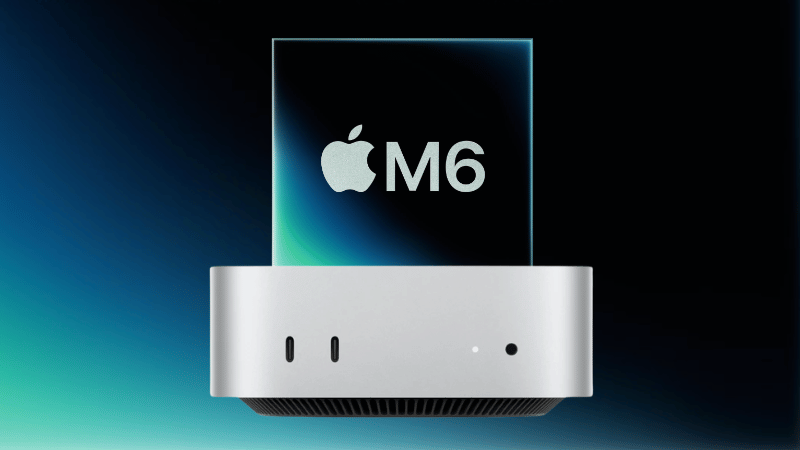
Not a VM. Not Shared. Your Own Mac Mini M6.
Real hardware
A physical Mac mini M6, never a virtual instance.
Dedicated resources
CPU, GPU and memory are fully allocated to you.
Remote access
Secure remote desktop and SSH connections from anywhere.
Flexible rental
Scale capacity with your projects instead of buying hardware.
Build Your Rent a Mac Mini M6 Order
One machine, one customer. Pick your term and IP type, then reserve your dedicated Mac mini M6.
1Choose your billing term
2Choose your IP address
Every term includes the same hardware: 12-core CPU, 12-core GPU, dual 16-core Neural Engine, 16GB unified memory, 256GB NVMe, 100Mbps unmetered bandwidth, Malaysia data centre, plus desktop, root SSH and Apple Remote Desktop access. Prices are in USD. Contact our Singapore team for SGD invoicing.
What Teams Run on a Rented Mac Mini M6
Built for anyone who needs genuine macOS and Apple silicon on hardware that no one else uses.
iOS and macOS CI/CD
Run Xcode builds plus unit and UI tests on a dedicated runner, without waiting in a queue behind other customers' jobs.
App notarisation and code signing
Keep your signing certificates and provisioning profiles on isolated hardware that only your team touches.
Cross-device testing farms
Pair the Mac with simulators or real devices and test across iOS, iPadOS and macOS in parallel.
On-device and local AI inference
Use the dual Neural Engine to serve Core ML models or local LLMs, without paying for cloud GPUs.
Xcode Cloud alternative
Control the whole build environment, including custom toolchains and cached dependencies, with no per-build compute limits.
Render and creative workloads
Send 3D, motion and video renders to your M6 while the team keeps working on their own machines.
Mac Mini M6 Specifications
Choose a category to see the full details.
Hardware
- Chip
- Apple M6, built on a 2nm process
- CPU
- 12-core
- GPU
- 12-core
- Neural Engine
- Dual 16-core
- Memory
- 16GB unified memory
- Storage
- 256GB NVMe
- Tenancy
- Bare metal, one customer per machine
Network and location
- Bandwidth
- 100Mbps unmetered
- IP address
- Static IP or Dynamic IP
- Data centre
- Malaysia, low latency to Singapore
- Network uplink
- 10Gb
- Uptime SLA
- 99.9%
- Power and cooling
- N+1 redundant, 24/7 on-site engineers
Access
- Remote desktop
- Screen Sharing, DeskIn
- Apple Remote Desktop
- Included
- Command line
- Root SSH
- Permissions
- Full administrator access
- Connect from
- Mac, Windows or Linux
Software
- macOS
- Latest stable release
- Xcode
- Install from the App Store
- Apple ID
- Sign in with your own developer account
- Updates
- Installed on your schedule
- Backups
- Optional paid add-on
You are responsible for following Apple's software and developer terms of service.
Mac Mini M6 or Mac Mini M4?
Both are dedicated, bare metal Macs in our Malaysia data centre. Here is how they differ.
| Feature | Mac mini M6 | Mac mini M4 | Buying your own Mac |
|---|---|---|---|
| CPU and GPU | 12-core CPU, 12-core GPU | 10-core CPU, 10-core GPU | Depends on model |
| Neural Engine | Dual 16-core | 16-core | Depends on model |
| Memory and storage | 16GB, 256GB NVMe | 16GB, 256GB NVMe | Depends on model |
| Bandwidth | 100Mbps unmetered | 100Mbps unmetered | Your own connection |
| Upfront cost | US$0 | US$0 | Full hardware cost |
| Maintenance | Managed | Managed | Self |
| From | US$119/mo | US$109/mo | One-off purchase |
| Best for | Local AI, rendering, heavy builds | CI/CD, automation, everyday macOS | Individuals |
| Configure M6 | View M4 |
Buying means upfront spend and upkeep
You pay the full hardware price, handle repairs and macOS upkeep, find desk space and power, and watch resale value drop.
Renting keeps it simple
Predictable monthly billing, fully managed hardware, access from anywhere and terms that fit your project.
Your Data on a Rented Mac Mini M6 Stays Yours
A strict zero access policy, credentials only you control and a certified wipe between customers.
Only you hold the credentials
You receive a fresh macOS install, create the admin account yourself and change every secret on first login.
We stay out of your system
We monitor power and network at the rack level only. Nothing inside your macOS reports back to us.
Time to migrate, then a wipe
You get a grace window to move your data. After that, the SSD is cryptographically erased and the keys are destroyed.
Verified clean before reuse
macOS is reinstalled from a clean image and the wipe is logged before the machine returns to our pool.
Rent a Mac Mini M6: Frequently Asked Questions
Yes. You get a physical, dedicated Apple Mac mini M6. It is not a virtual machine and it is not shared with other customers, so you have full access to the actual hardware.
Yes. Each machine is assigned to one customer at a time, with no shared resources and no noisy neighbours.
In our data centre in Malaysia, which gives you low latency connections across Singapore and the wider region.
Yes. Your Mac mini runs around the clock in the data centre and is ready whenever you want to connect.
Yes, upgrades are available, subject to hardware availability at the time. Contact our sales team for the current options.
We provide the latest stable macOS release. If you need a specific version, contact our support team to check availability.
Yes. With full administrator access you can install Xcode from the App Store, along with any other development tools you need.
Yes. You can build, test and debug iOS and macOS apps with Xcode and the Apple developer tools, just as you would on a Mac at your desk.
Yes. You have full administrator (root) access, so you can install software, change system settings and manage the machine as you need.
Yes. Any macOS compatible software can be installed with your administrator access.
Yes. Your rented Mac mini M6 suits CI/CD pipelines and works with GitHub Actions, Jenkins and other automation tools. You can self-host GitHub Actions runners on it.
Connect with DeskIn, Screen Sharing or SSH from any Mac, Windows or Linux device. Follow our DeskIn connection guide or Screen Sharing connection guide for step by step instructions.
Yes. SSH is enabled on your Mac's assigned IP address.
Yes. Choose Static IP or Dynamic IP when you select your plan. Static IP is selected by default.
No. Every plan includes 100Mbps of unmetered data transfer.
Yes, more than one user can access the Mac. We suggest agreeing on who uses it when, to avoid conflicts. Contact support for details about simultaneous connections.
Usually within 12 to 24 business hours after your order is confirmed.
Every plan includes 24/7 monitoring and support for hardware and connectivity issues.
Raise a support ticket and our team will reboot your Mac mini for you.
Contact support or raise a ticket at [email protected], and our Mac engineers will help you right away.
We do not offer refunds. You can cancel at any time to stop future billing, and you keep access until the end of your current billing period.
Backups are not included by default. They are available as an optional paid add-on, so you only pay if you need them. We still recommend keeping your own backup plan for critical data.
Your access ends and the Mac mini is securely wiped. You get a grace window to move your data first. See the security section above for the full process.
To keep our infrastructure secure and compliant, these are not permitted: any illegal activity, cryptocurrency mining, spam or unsolicited bulk email, hosting malware or attacking other systems, reselling or sub-leasing without approval, and anything that breaks Apple's software licence terms. Breaches may lead to suspension or termination, so please read our terms of service.
Your Dedicated Mac Mini M6, Racked and Ready
Start your M6 node today, or choose a Mac mini M4 for lighter workloads. Planning a reserved fleet for your team? Talk to our sales team.

Need help?
Submit a ticket and our 24/7 technical support team will get back to you.